Multi-level structures
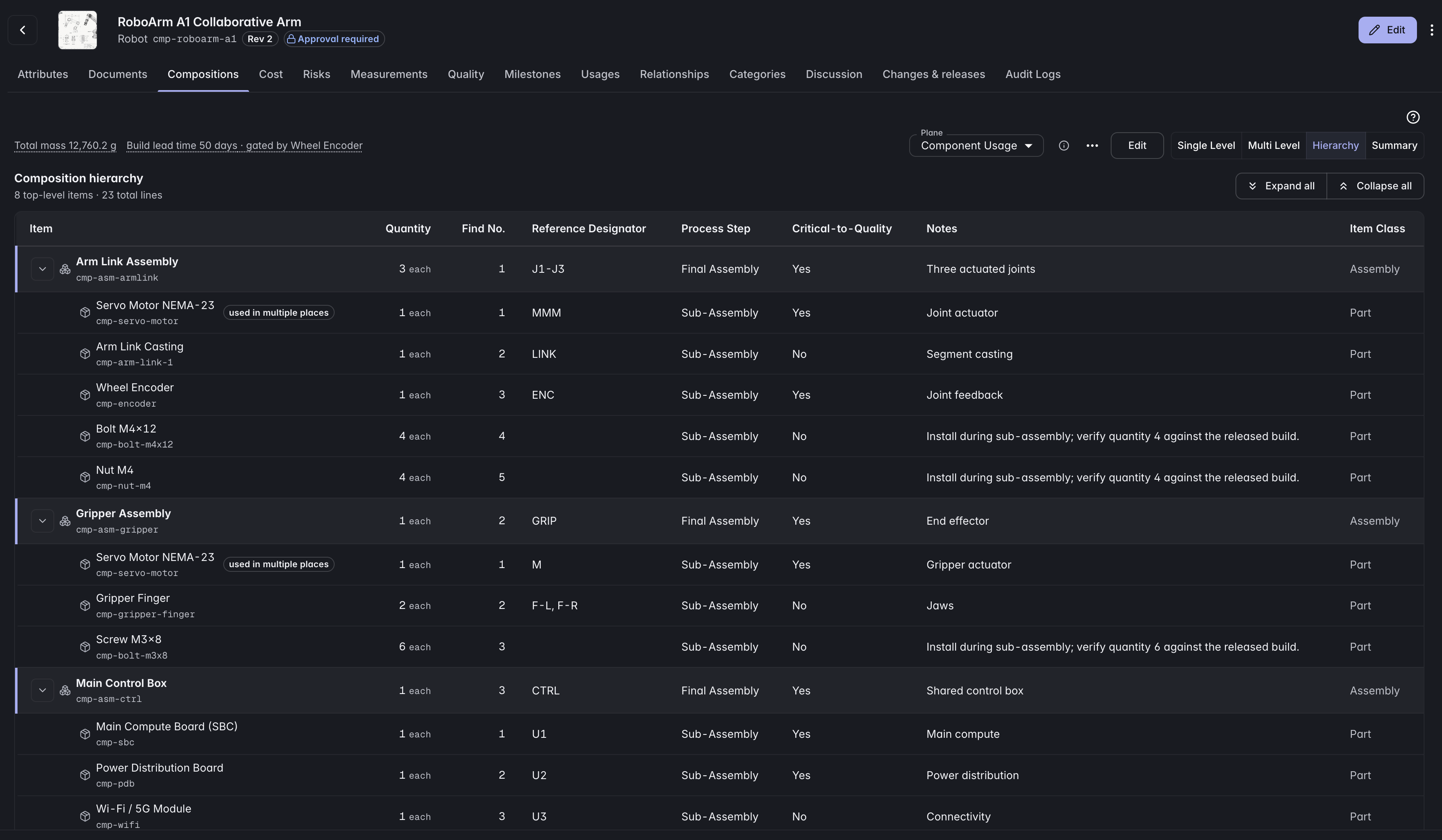
Build a bill of materials to any depth. Each line is its own record carrying quantity, unit, reference designator and notes, so the relationship holds data of its own.
In the APISee what goes into a product and which assemblies use a part. Compare BOMs, preserve baselines, and review the scope of a substitution before applying it.
 Click to enlarge
 Build a bill of materials to any depth. Each line is its own record carrying quantity, unit, reference designator and notes, so the relationship holds data of its own.
In the APISee which assemblies directly use a component, so you can identify affected products before proposing a change.
In the APIKeep several structures against one item — engineering, manufacturing, packaging. One plane is primary and drives every rollup and explosion; the rest stay readable and authorable beside it.
Record the parts that may stand in for a component, with the approval behind each one. The alternate is part of the data, not a note in a comment thread.
Choose which assemblies should receive a replacement component. Review the affected BOM lines before applying the substitution.
In the APIChange a line attribute everywhere a component appears in one operation, and see which bills of materials it could not touch and why.
In the APIFor process manufacturing: one input set producing several outputs, with co-products, by-products, per-output yield and absolute yield.
Roll any numeric field up the tree as the sum of each child times its raw quantity. Critical-path rollups take the longest path instead of the sum, for lead time.
In the APIExplode a structure to a flat parts list with exact and gross quantities. It works against an order or against a bare item, with no order needed.
In the APIFreeze the whole tree under a root and name it. Compare any later state against that baseline and read the added, changed and removed lines.
In the APIPut two structures side by side — two items, two revisions, two baselines — and read the difference line by line.
Start with your product model, connect the records, and bring your team into the same workflow.