Technical apparel performance corrections
Keep physical tests tied to the exact garment, fabric, size, method and current declared revisions. Follow fresh linked corrections and complete separate fit and performance release inspections; recorded outcomes never certify a claim.
Read the workflow docs →Revision-pinned sample and test reviews
Choose the physical sample, exact approved specification revision and tested size. Record actuals against the captured targets and tolerances, then make an explicit review decision with the evidence in view.
Read the workflow docs →Guided review capture
Work through specification and tested size, measurements and evidence, then decision and follow-up. Search and filter measurement points, jump to failures or blanks and use the keyboard to enter actuals. Coverage, unknown results and photos are summarized beside the reviewer’s explicit decision.
Read the workflow docs →Saved sample evidence
Inspect the targets, tolerances, measurements and judgments captured with each review. Search or filter the saved points without losing skipped observations, original notes, annotated photos or next-sample instructions. A blank observation remains distinct from a measured zero.
Read the workflow docs →Compare saved sample rounds
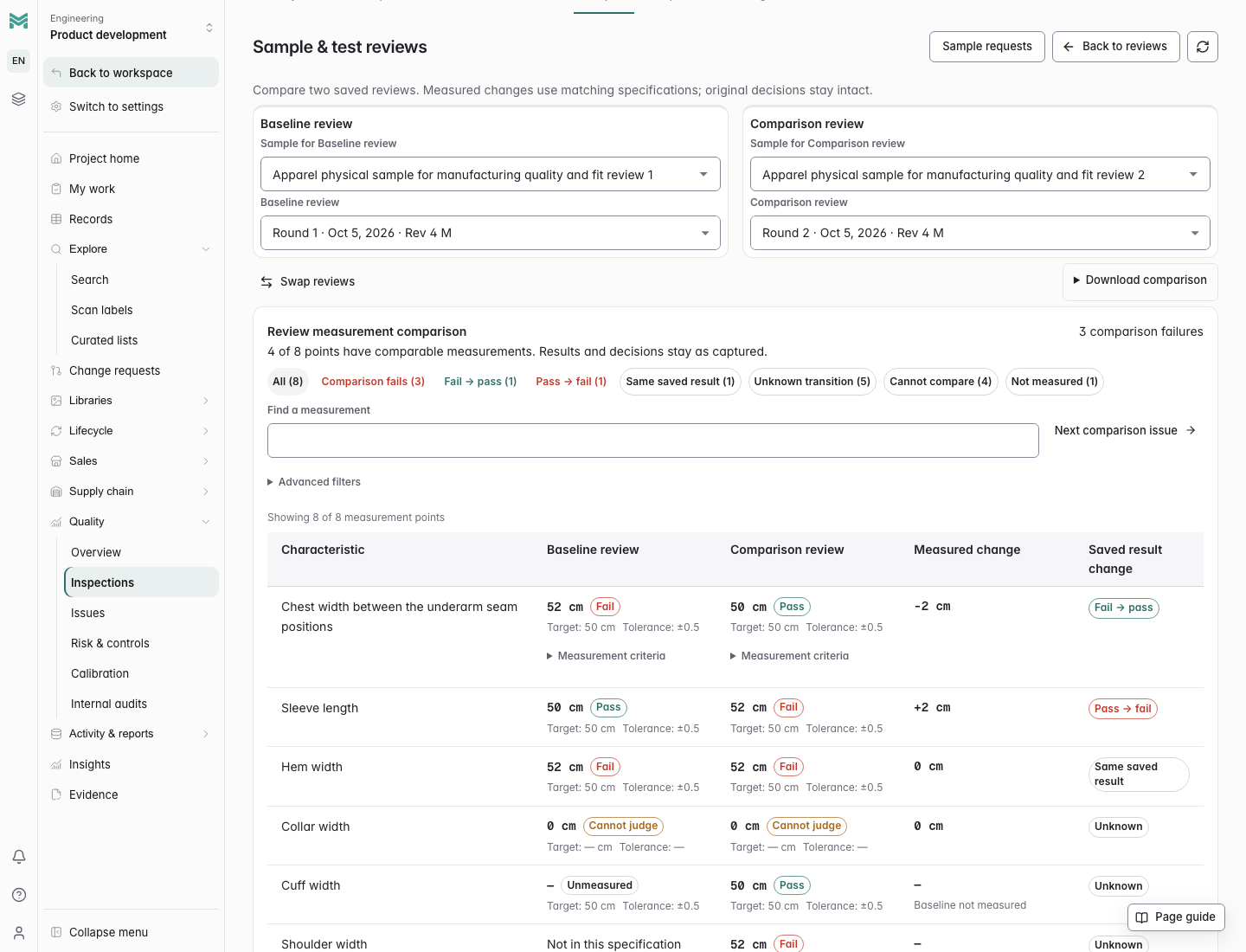
Choose exact reviews from the same or different physical samples. Filter fail-to-pass, pass-to-fail, remaining failures or points that cannot be compared, and swap the baseline and comparison. Numeric changes use matching captured criteria; missing measurements and specification differences retain their reasons and original decisions.
Read the workflow docs →Supplier sample handoffs
Track requests awaiting receipt or review, link supplier delivery commitments and record which physical sample arrived. Start a fresh follow-up review with the original approved revision and tested size selected. Keep receipt progress, review evidence and current quality action completion separate.
Read the workflow docs →Review photos and numbered callouts
Attach sample or test photos and annotate them with numbered pins and instructions. Saving a review captures the photos, annotations and measured evidence together for the next round.
Read the workflow docs →Recoverable sample review drafts
Keep authored review drafts and uncertain saves across closed tabs in the same browser. Reopen the saved draft, confirm current access and explicitly retry an unconfirmed save with its original request. Browser data clearing can remove local recovery.
Read the workflow docs →Quality insight dashboards
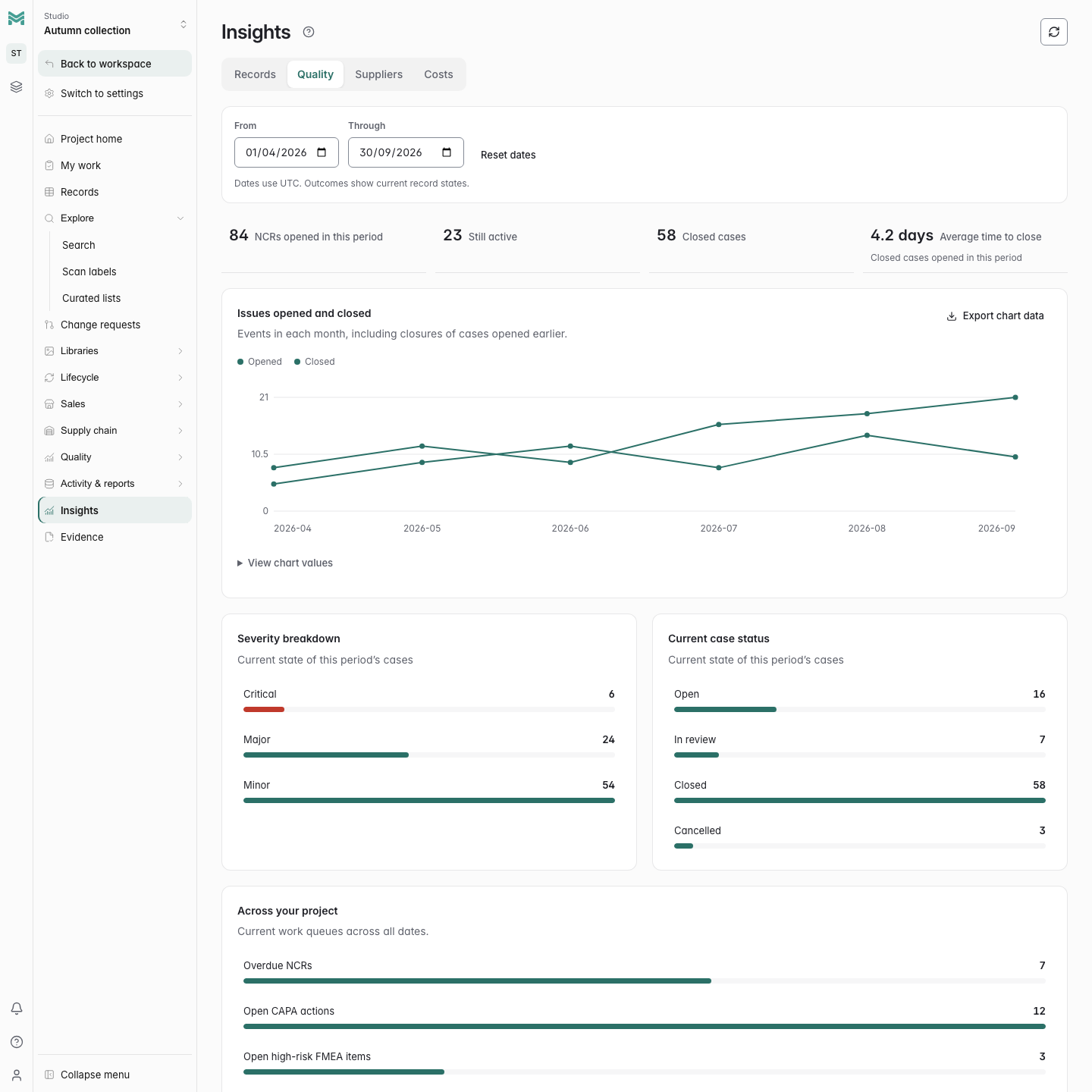
Review nonconformance openings and closures over a selected reporting period, along with severity, active cases and closure timing. Open the underlying evidence and export chart data to support your team's review.
Recall response cases
Save bounded lot-genealogy evidence, assign containment and recovery work for every affected lot, and extend scope without erasing earlier evidence. Complete response work and an explicit coverage assessment before independent closure. Available in the app, REST and MCP; physical recovery still requires verification.
Read the workflow docs →Controlled concessions
Approve exceptions for a specific item revision and lot with a quantity limit, expiry and conditions. Record usage without exceeding the allowance, preserve independent decisions, and withdraw or correct records without erasing history. Available through the app, REST and MCP.
Read the workflow docs →First-article approval packages
Bind a supplier’s sample lot to an exact item revision. Track required inspection and characteristic coverage, freeze actual results, and preserve independent decisions and resubmissions. Available in the app, REST and MCP without automatically releasing production.
Read the workflow docs →Calibration equipment register
Track instruments, owners, locations and calibration intervals. Filter by status or due window, search the register, and export the visible equipment list for scheduling and review.
Read the workflow docs →Immutable calibration evidence
Record passing and failed calibrations with dates and notes. Attach a private PDF, PNG or JPEG certificate, reuse recorded evidence, and download original files through authenticated access. History exports retain certificate metadata.
Read the workflow docs →Internal audits and follow-up reviews
Plan scoped audits, record checklist conclusions and assign nonconformance follow-ups. Link native NCR/CAPA work, require independent closure verification, retain evidence and every review, and export the complete report. Changed evidence requires review; team criteria do not certify compliance.
Read the workflow docs →Quality audit-pack export
Select dates and quality areas to download linked CSV evidence, private calibration certificates and a SHA-256 manifest from one consistent snapshot. Explicit scope notes and whole-export limits prevent silent omissions.
Read the workflow docs →Verifiable evidence packages
Capture private quality, release and configuration packages. Your organization approves optional Algorand publication in Pera Wallet, while ManyRows stores only its public address. Download and verify packages without a wallet.
Read the workflow docs →Calibration failure impact and recovery
Trace inspections potentially affected by a failed calibration. Record an impact assessment, track required reinspections and their replacement evidence, and document containment resolution without rewriting the original checks.
Read the workflow docs →Nonconformance and material review
Turn a rejected inspection into a tracked nonconformance with containment, ownership and a due date. Route disposition through independent review and verify execution before closing the case.
Read the workflow docs →Rework execution and reinspection
Execute an NCR's rework decision with assigned instructions, partial completion and repeat cycles. Link fresh revision-matched inspections, preserve measured evidence, and require independent verification before the NCR can advance.
Read the workflow docs →Scrap execution and disposal evidence
Carry out an NCR's scrap decision with quantity-controlled partial disposal, methods and supporting records. Preserve correction history and require independent verification before the NCR can advance.
Read the workflow docs →Corrective and preventive action
Investigate linked failures, record root cause, and assign containment, corrective and preventive actions. Track independent approval and effectiveness evidence alongside the case history.
Read the workflow docs →Design and process FMEA
Assess failure modes against a product revision using severity, occurrence and detection scores. Retain mitigation evidence and residual risk, with independent review before approval. Prepare readable print/PDF review copies with recorded controls, actions and risk acceptance.
Read the workflow docs →Production control plans
Turn an approved process FMEA into production controls with specifications, measurement methods, sampling, reaction plans and inspection bindings. Keep coverage and approval evidence with the plan, and prepare complete print/PDF copies with every control line for production review.
Read the workflow docs →Check records
Record lab dips, fit checks, inspections, and tests against the relevant product or material. Follow successive rounds and their results in one history.
Read the workflow docs →Requirement coverage
Review requirement-to-design mappings against exact approved revisions and native inspection evidence. Start from a design to find linked requirements across record types, including failed or stale evidence on other designs. Retain complete bounded JSON reports alongside current coverage and review history.
Read the workflow docs →Disposition
Close a check with a real decision: approve, use as is, rework or scrap. The disposition is a field with rules, not a comment someone has to interpret.
Stale approvals
When the spec moves on after a check passed, the approval is flagged as stale rather than silently continuing to look valid.
Certificates and expiry
Keep certificate issue and expiry dates with the relevant record. Filter by expiry to find certificates that need renewal.
Sample requests and linked follow-up
Request a supplier sample from its review, connect the delivery commitment and receipt, and open the linked follow-up. Keep cancellation or reopening reasons and the original sample and specification evidence traceable.
Read the workflow docs →Lot genealogy and recall impact
Trace consumed-lot relationships into affected downstream lots. Review the bounded impact assessment, with incomplete scope and unavailable evidence visible, before assigning recall response work.
Read the workflow docs →Life limits
Track hours, cycles, or distance against a usage limit. Keep recorded usage visible when a limit is unset, with remaining life unknown. A positive limit restores the remaining-life calculation and percentage gauge.
Read the workflow docs →Current robot-unit condition
Review fitted physical serials, serviceability, independent unit and component hours, and traceability findings from Maintenance. Flag mismatches, duplicate fitments, holds and reached limits while retaining the original maintenance evidence.
Read the workflow docs →Recorded robotics maintenance
Find recorded replacements from a unit or work order, then open the original completion receipt, saved before/after fitments and JSON evidence download. Later fleet changes leave the captured evidence intact.
Read the workflow docs →Operating intervals and recovery
Save a unit service interval and its selected physical-component usage together. Reopen or reload a pending interval and explicitly retry its exact saved request on the same device, without counting the same interval twice.
Read the workflow docs →Live operating history
Review service dates, independent hours, notes and original serial links through paged native service and component usage records. Native edits appear on refresh, including usage for serials removed from current fitment.
Read the workflow docs →Racing evidence register and reply review
Review scoped submissions and replies with exact approved revision links and a UTC timeline. Choose an approved revision from its frozen context, then read written conditions and timing beside a work order before a human decides to proceed.
Read the workflow docs →